Reading TIFFs to CUDA memory
Overview
In this tutorial, you learn:
How to read a GeoTIFF into an xarray.DataArray backed by CuPy arrays
Understand some of the limitations of the
cog3pioengine
Prerequisites
You will need to have a CUDA-enabled GPU (Volta generation or newer), and be running
on Linux, either x86_64 or aarch64 platform. Please ensure that you have installed
cupy-xarray with the ‘tiff’ extras that contains the cog3pio dependency, e.g. via
pip install cupy-xarray[tiff]
or if you are using conda, manually install cog3pio via
conda install -c conda-forge cog3pio cupy-xarray
There may be other system prerequisities needed by the underlying nvTIFF library used
by cog3pio, which you can check at
https://docs.nvidia.com/cuda/nvtiff/index.html#prerequisites
Introduction
In this tutorial, we will learn how to read data stored in a GeoTIFF format into CUDA
GPU memory. This will use the cog3pio Python/Rust
library that contains bindings to
nvTIFF which does GPU-accelerated
decoding of TIFF (Tagged Image File Format) files.
Let’s now import our packages
import cupy as cp
import xarray as xr
Check that the Cog3pioBackendEntrypoint engine is available:
xr.backends.list_engines()
{'netcdf4': <NetCDF4BackendEntrypoint>
   Open netCDF (.nc, .nc4 and .cdf) and most HDF5 files using netCDF4 in Xarray
   Learn more at https://docs.xarray.dev/en/stable/generated/xarray.backends.NetCDF4BackendEntrypoint.html,
 'cog3pio': <Cog3pioBackendEntrypoint>
   Use .tif files in Xarray
   Learn more at https://cog3pio.readthedocs.io/en/latest/,
 'store': <StoreBackendEntrypoint>
   Open AbstractDataStore instances in Xarray
   Learn more at https://docs.xarray.dev/en/stable/generated/xarray.backends.StoreBackendEntrypoint.html}
Reading a single RGB GeoTIFF
We’ll first read this
EOX cloudless mosaic
(low-resolution version) GeoTIFF file with 3 bands (Red, Green, Blue), compressed
using Deflate. Use
xarray.open_dataarray(),
passing in the HTTP URL to the .tif file, configure engine="cog3pio" (shorthand for
engine=Cog3pioBackendEntrypoint) and set the device_id parameter to 0 to read
into CUDA GPU 0.
# Read GeoTIFF into an xarray.DataArray
dataarray: xr.DataArray = xr.open_dataarray(
    filename_or_obj="https://data.source.coop/pangeo/example-tiff/geotiff-test-data/real_data/eox/eox_cloudless.tif",
    engine="cog3pio",
    device_id=0,  # cuda:0
)
dataarray
<xarray.DataArray 'raster' (band: 3, y: 256, x: 512)> Size: 393kB
[393216 values with dtype=uint8]
Coordinates:
  * band     (band) uint8 3B 0 1 2
  * y        (y) float64 2kB 89.65 88.95 88.24 87.54 ... -88.24 -88.95 -89.65
  * x        (x) float64 4kB -179.6 -178.9 -178.2 -177.5 ... 178.2 178.9 179.6
isinstance(dataarray.data, cp.ndarray)
True
That was quick and easy wasn’t it? You now have an xarray.DataArray with dimensions
channels/band: 0, height/y: 2355, and width/x: 2325 in CUDA GPU memory!
We can plot this RGB image by calling
.plot.imshow()
on the xarray.DataArray.
dataarray.plot.imshow()
<matplotlib.image.AxesImage at 0x7efd54316ba0>
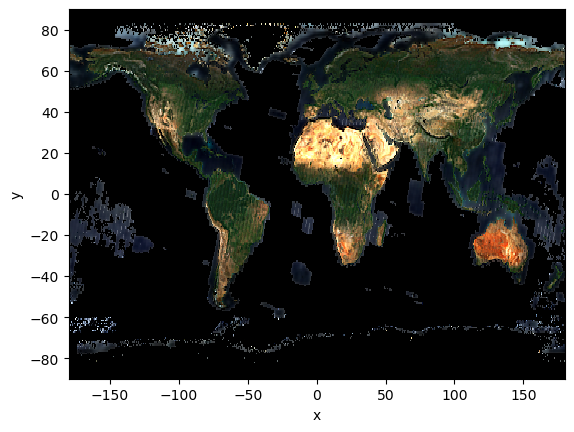
Notice that most of the ocean areas are coloured black (pixel value 0) instead of
with a transparent colour. This is because cog3pio=0.1.0 doesn’t have the ability to
deal with NaN values yet, so you will need to manually handle this.
Concatenate multiple single-band GeoTIFFs
Let’s now try a slightly trickier set up - with bands stored in different files!
We’ll use LandCoverNet images over Australia. Specifically, we’ll read multiple
Sentinel-2 bands using
xr.open_mfdataset,
ensuring that the list of URLs/filepaths correspond to the band order we want.
Note that some parameters are different than before:
concat_dim="band"andcombine="nested": ensures that the bands are concatenated as data_vars along the dimension ‘band’device_id=None(actually the default setting): so that the data is decoded by whatever GPU is available (usually this is the first CUDA GPU device, unless you are using dask-cuda with multiple GPUs).
dataset: xr.Dataset = xr.open_mfdataset(
    paths=[
        "https://data.source.coop/radiantearth/landcovernet/landcovernet_au/data/v1.0/2018/56JMS/16/S2/56JMS_16_20180214/56JMS_16_20180214_B04_10m.tif",
        "https://data.source.coop/radiantearth/landcovernet/landcovernet_au/data/v1.0/2018/56JMS/16/S2/56JMS_16_20180214/56JMS_16_20180214_B03_10m.tif",
        "https://data.source.coop/radiantearth/landcovernet/landcovernet_au/data/v1.0/2018/56JMS/16/S2/56JMS_16_20180214/56JMS_16_20180214_B02_10m.tif",
    ],
    engine="cog3pio",
    concat_dim="band",
    combine="nested",
    device_id=None,
    parallel=True,
)
dataset
<xarray.Dataset> Size: 397kB
Dimensions:  (band: 3, y: 256, x: 256)
Coordinates:
  * band     (band) uint8 3B 0 0 0
  * y        (y) float64 2kB 7.187e+06 7.187e+06 ... 7.184e+06 7.184e+06
  * x        (x) float64 2kB 4.962e+05 4.962e+05 ... 4.988e+05 4.988e+05
Data variables:
raster (band, y, x) uint16 393kB dask.array<chunksize=(1, 256, 256), meta=np.ndarray>Next, we’ll retrieve the ‘raster’ xarray.DataArray data_var from the xarray.Dataset,
and then call .load()
to materialize the actual array into memory. This is because xr.open_mfdataset does
lazy loading into Dask arrays by default, but we want CuPy arrays!
raster: xr.DataArray = (
    dataset.raster.load()  # needs https://github.com/pydata/xarray/pull/11381 to prevent TypeError
)
# assert isinstance(raster.data, cp.ndarray) # TODO: dask loads into numpy, not cupy ☹️
raster
<xarray.DataArray 'raster' (band: 3, y: 256, x: 256)> Size: 393kB
array([[[ 395,  404,  412, ...,  423,  437,  481],
        [ 397,  412,  412, ...,  404,  456,  523],
        [ 398,  401,  408, ...,  420,  502,  560],
        ...,
        [ 360,  353,  361, ...,  373,  455,  457],
        [ 364,  361,  370, ...,  324,  376,  382],
        [ 372,  366,  370, ...,  339,  340,  356]],

       [[ 763,  743,  742, ...,  787,  824,  905],
        [ 729,  743,  761, ...,  787,  869,  963],
        [ 743,  746,  749, ...,  783,  895, 1005],
        ...,
        [ 715,  744,  753, ...,  507,  536,  508],
        [ 741,  736,  746, ...,  488,  520,  487],
        [ 741,  736,  744, ...,  479,  491,  487]],

       [[ 682,  689,  721, ...,  671,  700,  754],
        [ 695,  714,  703, ...,  675,  745,  781],
        [ 691,  711,  702, ...,  668,  754,  819],
        ...,
        [ 682,  696,  702, ...,  296,  332,  313],
        [ 697,  714,  689, ...,  288,  313,  280],
        [ 703,  700,  692, ...,  274,  283,  266]]],
      shape=(3, 256, 256), dtype=uint16)
Coordinates:
  * band     (band) uint8 3B 0 0 0
  * y        (y) float64 2kB 7.187e+06 7.187e+06 ... 7.184e+06 7.184e+06
* x (x) float64 2kB 4.962e+05 4.962e+05 ... 4.988e+05 4.988e+05Finally, we’ll plot the RGB image. This is over a location at Hervey Bay, north of Sunshine Coast in Queensland, Australia.
raster.plot.imshow(robust=True)
<matplotlib.image.AxesImage at 0x7f740e25b9d0>
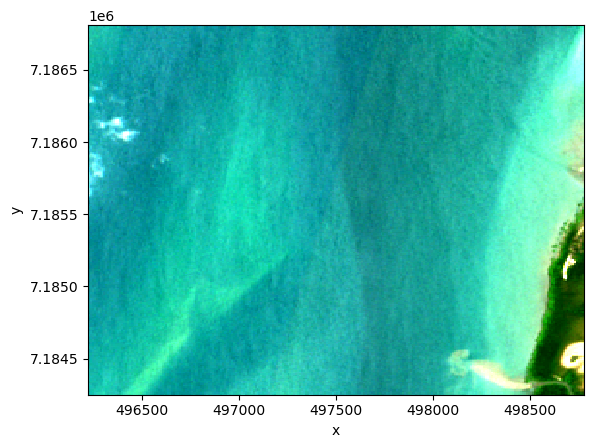
There’s some cloud to the left, mostly water in the middle, and a strip of land on the right. See if it matches with the label classifications here.
Summary
Awesome, you’ve now learned how to read GeoTIFFs into CUDA GPU memory, and uncovered some of the limitations such as no NaN handling and lack of support for certain compression types (TODO). This is a work in progress though, so feel free to open issues to contribute improvements if you’re keen to help!